Reviewed by our editorial team Updated
Why Orientation Tools Matter for Travellers
Most travellers rely on maps and navigation apps, but these are only as good as your connection. The moment you lose signal, run out of battery, or move into remote terrain, even the best navigation tools can fail.
That is where orientation tools become essential.
Apps that use your phone’s built-in sensors can provide direction, elevation, and environmental awareness without needing mobile data. This makes them particularly valuable for travellers heading into mountains, rural areas, deserts, or unfamiliar locations where connectivity is unreliable.
Even outside of extreme environments, these tools are useful. They help you understand which way you are facing, how your surroundings are changing, and where you are positioned relative to landmarks. This can be helpful when navigating unfamiliar streets, planning photography, or travelling in low-visibility conditions such as fog.
In 2026, orientation apps have evolved into compact, all-in-one toolkits, combining compass, altitude tracking, and environmental data into a single interface. Used correctly, they act as a reliable backup system when standard navigation fails.
How Orientation Tools Work
Orientation tools rely on a combination of your smartphone’s internal sensors, working together to provide accurate, real-time data.
The magnetometer detects the Earth’s magnetic field and allows your phone to function as a compass, showing direction relative to magnetic or true north. This is the core feature used for navigation and positioning. The angle between magnetic and true north shifts gradually as the field moves, and is measured and modelled by the British Geological Survey.
The GPS chip determines your location and can estimate altitude based on satellite positioning. While this is generally accurate, it can vary slightly depending on terrain and signal quality.
The barometer, where available, measures atmospheric pressure. This allows apps to calculate changes in elevation more precisely and can also provide early indicators of weather changes.
The accelerometer and gyroscope help stabilise readings and ensure the device adjusts correctly as you move, tilt, or rotate it.
When combined, these sensors allow apps to provide a surprisingly accurate picture of direction, height, movement, and environmental conditions, all without needing an internet connection.
Best for two or three nights. The widest choice of rooms, with filters for free cancellation and included breakfast.
View staysBest for longer stays. Whole apartments and houses, so you are not eating out three times a day.
View rentalsBest for double-checking. Runs the same search across several booking sites so you are not leaving money behind.
Compare pricesWhat to Look For in an Orientation App
Not all orientation tools perform equally well, and choosing the right one can make a significant difference when you actually need it.
The most important factor is offline reliability. A good app should work fully without mobile data, using only your device’s internal sensors. If it requires a connection to function, it defeats the purpose.
Accuracy is equally important. Apps that combine GPS data with barometric readings tend to provide more reliable altitude information, particularly in mountainous or uneven terrain.
Ease of use matters more than most people expect. When you are outdoors or under pressure, you need an interface that is clear, fast, and easy to interpret, not cluttered with unnecessary features or ads.
Some apps also include additional tools such as AR overlays, sun and moon tracking, or horizon levels. While these are not essential, they can add value for travellers interested in photography or navigation planning.
The best orientation apps strike a balance between accuracy, simplicity, and reliability, ensuring they are useful when you actually need them, not just when you are testing them at home.
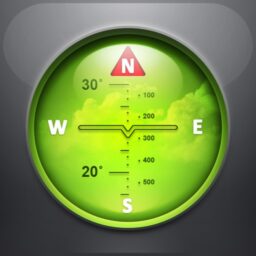
Spyglass
Spyglass is one of the most advanced orientation apps available in 2026, combining multiple tools into a single, highly visual interface. Instead of just showing direction, it overlays real-time data directly onto your camera view, creating a heads-up display that blends navigation with your surroundings.
This makes it particularly useful when you need context, not just direction. You can see where you are facing, track your position, and understand elevation changes without switching between screens. For travellers exploring remote landscapes, this creates a much clearer sense of orientation than a traditional compass alone.
The app also includes altitude tracking, barometric pressure readings, and waypoint navigation, allowing you to mark locations and return to them later. Features such as sun and star tracking add another layer of usefulness, particularly for photographers or anyone planning outdoor activities around light conditions.
Because it relies on your phone’s sensors rather than mobile data, Spyglass works well offline, making it a reliable option when signal drops. The interface is more technical than basic apps, but once understood, it becomes a powerful all-in-one tool.
For travellers who want more than just a compass, Spyglass offers a complete orientation system with strong visual feedback.
App availability and prices vary by country. Some of these may not appear in your local App Store or Google Play.
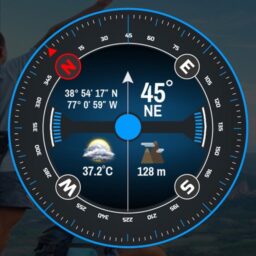
GPS Tools®
GPS Tools is designed for travellers who want everything in one place, combining multiple orientation features into a single app. Rather than focusing on one function, it brings together compass, altimeter, barometer, speed tracking, and location data in a unified interface.
This makes it particularly useful in environments where conditions can change quickly. You can monitor your direction, elevation, and weather indicators at the same time, helping you make better decisions when moving through unfamiliar terrain.
One of its key strengths is its ability to operate reliably offline, using your phone’s internal sensors to provide consistent readings even when you lose signal. This is especially valuable in mountainous regions or remote areas where connectivity is limited.
The app also includes weather tracking and pressure graphs, which can give early indications of changing conditions. While it is not a replacement for a full weather app, it provides useful additional context when you are already outdoors.
The main drawback is that the interface can feel busy, particularly on smaller screens. However, for travellers who prioritise functionality over simplicity, GPS Tools delivers a highly capable and practical solution.
App availability and prices vary by country. Some of these may not appear in your local App Store or Google Play.

Smart Compass
Smart Compass focuses on doing one thing well: providing a clear, reliable compass with minimal distractions. It is part of a broader suite of tools, but as a standalone app, it is designed to be lightweight, fast, and easy to use.
The app delivers accurate directional readings using your phone’s magnetometer, with features such as tilt correction and automatic calibration helping to improve accuracy. This makes it particularly useful when you need quick bearings without navigating complex menus.
Because of its simplicity, Smart Compass works well in situations where you need immediate, dependable information. It loads quickly, functions offline, and avoids unnecessary features that could slow you down when you are on the move.
It also integrates basic GPS positioning, allowing you to combine direction with location awareness, although it does not include the broader toolset found in more advanced apps.
For travellers who want a straightforward, no-nonsense compass app, Smart Compass remains one of the most practical options available.
App availability and prices vary by country. Some of these may not appear in your local App Store or Google Play.
Comparison Table of Key Features
When comparing orientation tools, the main differences come down to how many features you need and how complex you are willing to go.
| Feature | Spyglass | GPS Tools | Smart Compass |
|---|---|---|---|
| Compass | Yes | Yes | Yes |
| Altimeter | Yes | Yes | No |
| Barometer | Yes | Yes | No |
| AR Display | Yes | No | No |
| Offline Use | Yes | Yes | Yes |
| Platform | iOS | Android | Android |
Spyglass is the most advanced and visual option.
GPS Tools offers the widest range of features in one place.
Smart Compass is the simplest and most reliable for quick use.
Orientation Tool Safety Tips
Using orientation apps can make a huge difference when travelling off-grid, but they should always be used with a clear understanding of their limitations.
The first step is to calibrate your compass properly before relying on it. Most apps guide you through this process, but skipping it can lead to inaccurate readings, especially after travelling or changing environments.
It is also important to test your app before you actually need it. Try using it in a familiar location so you understand how it behaves, how accurate it is, and how quickly it responds. This removes uncertainty when you are in an unfamiliar or remote setting.
Be aware that your phone can be affected by metal objects, electronics, or magnets, which may distort compass readings. Keeping your device away from these influences helps maintain accuracy.
While barometric tools can indicate changing weather conditions, they should be treated as supporting information rather than a primary forecast. A sudden drop in pressure can suggest worsening weather, but it should always be considered alongside a dedicated weather app.
Most importantly, never rely on a single tool. Carrying a backup such as a physical map or compass ensures you are not dependent on battery life or device performance when it matters most.
Best for long or awkward journeys. Builds one itinerary out of separate flights.
View flightsBest for anyone whose home plan charges by the megabyte abroad. Pay a fixed price up front.
Check eSIMsBest when public transport has stopped, or when you are travelling with children and bags.
Book a transferUsage Considerations and Practical Limitations
Orientation apps are widely accessible and generally unrestricted, but there are a few practical considerations that travellers should keep in mind.
In most countries, there are no legal restrictions on using compass, altimeter, or barometer apps. However, certain national parks or remote environments may recommend or require traditional navigation tools as a backup, particularly for safety reasons.
Accuracy can vary depending on how the app calculates data. GPS-based altitude readings can fluctuate slightly in dense forests or valleys, while barometric readings require occasional calibration to remain precise.
Battery usage is another important factor. Although these apps are relatively efficient, prolonged use of GPS and sensors can still drain your device. Managing battery life becomes critical on longer trips where charging options are limited.
It is also worth reviewing app permissions, particularly for location data. Most orientation tools require access to your device’s location and sensors to function correctly, so understanding what data is being used helps you stay informed and in control.
Being aware of these limitations ensures that orientation tools remain a useful aid rather than a single point of failure.
App Availability by Region
Most orientation apps are widely available across major regions, including the UK, Europe, North America, Australia, and New Zealand. In these areas, you can download and use them without restriction through standard app stores.
However, availability can vary in certain parts of the world. In regions where access to app stores is restricted or where specific platforms are limited, some apps may not be available or may require alternative installation methods.
For example, apps that rely on Google services may have reduced availability in certain markets, while others may be removed from local app stores due to regional policies.
The most practical approach is to download and test your apps before travelling, ensuring they are fully installed and working correctly. This removes any uncertainty once you arrive at your destination, particularly if connectivity is limited.

Rupert’s Handy Travel Tips
Compass and orientation apps are powerful tools, but a few extra moves will help you get the best results outdoors:
- Pair tools: Use a barometric altimeter with a compass app for accurate elevation and direction combined.
- Experiment with AR: Apps like Spyglass add augmented reality views that make navigation and photography more engaging.
- Pre-load your route: Save tracks in GPS Tools or mark waypoints in Spyglass before heading into areas with poor signal.
- Check accuracy first: Test your compass app in a familiar place before trusting it on a remote hike.
- Always carry a backup: A physical compass or map is essential insurance if your phone battery fails.
Want to meet the reindeer behind our travel tips? Find out more in our page Who is Rupert?.


Frequently Asked Questions
What’s the difference between compass apps and GPS apps?
Compass apps use your phone’s magnetometer to detect direction based on the Earth’s magnetic field, while GPS apps rely on satellite positioning to determine your exact location. Many orientation tools combine both, giving you a more complete picture of direction and position.
Do orientation apps work offline?
Yes. Most orientation tools use your phone’s internal sensors and do not require an internet connection. However, if the app includes maps, you will need to download them in advance for offline use.
Why does my phone’s compass sometimes give inaccurate readings?
Compass accuracy can be affected by nearby metal objects, magnets, or electronic interference. Calibrating your device regularly and keeping it away from these influences improves reliability.
Are altimeter apps reliable for hiking?
They can be very useful, but accuracy depends on the method used. Barometric altimeters are generally more precise but require calibration, while GPS-based readings may vary slightly depending on terrain.
Can barometer apps predict the weather?
They can provide useful indicators. A drop in pressure often suggests worsening weather, while rising pressure indicates more stable conditions. However, they should always be used alongside a dedicated weather forecast.
Further Reading & Related App Guides
A reliable compass is only one part of staying on track once you are away from familiar streets. Pairing it with a dedicated offline map app gives you a fuller picture of the terrain ahead, while travellers heading further off the beaten path may want to add a specialist hiking app to plan routes and track progress.
Conditions can change quickly outdoors, so it is worth checking a weather app before you set out, particularly if you are relying on barometric readings for early warning signs. Once you are back among buildings and public transit, a good local transport app makes it far easier to navigate unfamiliar streets and connections.
Finally, it is always worth protecting your trip against the unexpected. A dependable travel insurance app means you are covered if plans change, whatever navigation tools you are carrying to find your way.
Why Do Some of the App Links Look Broken?
If you click on an app link and it doesn’t open in your store, it usually isn’t an error on our end. Many travel apps are geo-locked, meaning they’re only available in certain countries or regions. If you’re browsing from outside those regions, the link may appear broken; the app is still live and accessible for users in supported locations.